Getting Started · Setup
How to Install DSMapStudio
How to Install DSMapStudio
Most failed installs share one cause: people click the green Code button on GitHub, download Source-code.zip, unpack it, and find no DSMapStudio.exe anywhere — because that archive is the C# source, not the program. DSMapStudio is a portable Windows tool with no installer wizard, so "installing" it is three things: download the correct release zip, add two runtimes Windows doesn't ship by default, and extract somewhere it can write files.
Step 1 — Download the correct file
Go to the download page or GitHub Releases. Under the latest release (v1.11.1), open the Assets dropdown and download DSMapStudio.zip (sometimes version-suffixed). That's the built program.
⚠️ Do not download "Source code (zip)." GitHub auto-generates that link on every release and on the green Code button — it's
.cssource, not a runnable build, so it extracts to asrcfolder with noDSMapStudio.exe. This single mistake is the most-reported "DSMapStudio won't run" issue. Already did it? Delete it and grab the asset zip from the Releases page instead.
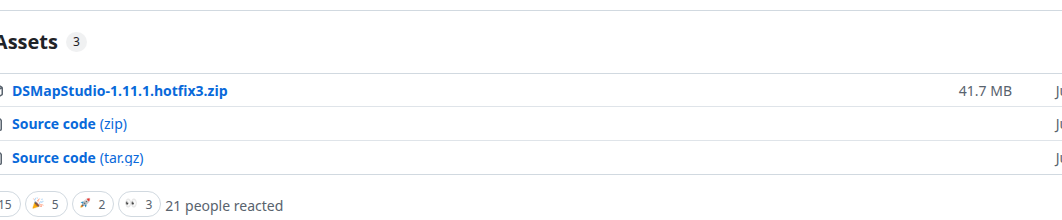
GitHub Releases → Assets: the built program is the DSMapStudio…zip, above the "Source code" links.
Since v1.09 the zip also ships a Low Requirements executable. No Vulkan-capable GPU — most Intel-integrated laptops — that build runs the Param and Text editors without the 3D Map Editor. No separate download; both executables live in the extracted folder.
Step 2 — Install the Visual C++ x64 and .NET 7 runtimes
DSMapStudio is a C# app (Veldrid + ImGui.NET) that depends on two Microsoft runtimes a clean Windows install often lacks:
- Microsoft Visual C++ 2015–2022 Redistributable (x64) —
aka.ms/vs/17/release/vc_redist.x64.exe. Install the x64 build specifically; x86 won't satisfy the dependency. Its absence is the classic silent failure: with the x64 VC++ runtime missing, v1.11.1 opens no window at all — no error dialog, the process just never appears, which is exactly why people mistake it for a corrupt download. - .NET 7 Desktop Runtime (x64) — DSMapStudio moved to .NET 7 in v1.08. Install the Desktop Runtime (not ASP.NET, not the plain runtime) from Microsoft's .NET download site.
Install both before first launch and reboot if the VC++ installer asks.
Step 3 — Extract it
Right-click DSMapStudio.zip → Extract All to a writable folder you control — C:\Modding\DSMapStudio\ or a Desktop folder both work. It writes project files, logs, and a Paramdex cache beside its executable, so it needs a writable location.
⚠️ Avoid
C:\Program FilesandProgram Files (x86). Windows protects those paths; DSMapStudio's config/log writes there can fail silently or throw permission errors on launch.
After extracting you should see DSMapStudio.exe, a Low Requirements executable, and supporting .dll files and asset folders. A src folder or a .sln instead means you extracted the source archive — back to Step 1.
Step 4 — First launch
Double-click DSMapStudio.exe. On a Vulkan GPU you get the full window with editor tabs along the top; first run may take a few extra seconds while it initializes Paramdex.
A blue SmartScreen "Windows protected your PC" prompt is expected for an unsigned open-source tool — More info → Run anyway. If antivirus quarantines the executable (some flag the file-injection libraries it bundles), restore it and add the folder to exclusions. A startup crash that drops a log file in the folder is almost always a missing runtime from Step 2 — open the log and it names the missing dependency.
Step 5 — Create your first project
DSMapStudio doesn't edit your game directly — you create a project that points at your game's files and writes mod output to a separate folder. On launch, New Project, then:
- Project Name — any label.
- Project Directory — an empty folder for the mod's edited files.
- Game Directory — the folder with your game's executable and data. For Steam titles, inside
steamapps\common\...— but DSMapStudio reads UXM-unpacked files, not the packed install, and the path differs per game.
Set Game Type to your game explicitly (it controls which param definitions load). Because directory paths and the UXM step vary across the nine games, that process has its own walkthrough.
→ Continue: Creating Your First DSMapStudio Project.
System requirements
Whether you get the full tool or only Param/Text depends entirely on your GPU:
| Component | Minimum | Notes |
|---|---|---|
| OS | Windows 7 x64 | Windows 10/11 x64 recommended |
| GPU (Map Editor) | Vulkan 1.3 — NVIDIA Maxwell (900) / AMD Polaris (400) or newer | Intel integrated graphics are not supported for the 3D viewport |
| VRAM | 4 GB | 8 GB for DS3, Bloodborne, Sekiro, Elden Ring, AC6 |
| Runtime | Visual C++ x64 + .NET 7 Desktop Runtime | See Step 2 |
| No-GPU option | Low Requirements executable | Param + Text only, no Map Editor |
| Linux | Wine 9.0+ | Unofficial; expect rough edges |
On an Intel iGPU, don't fight the Map Editor — use the Low Requirements executable and see Intel GPU: no Vulkan.
Keeping it updated
DSMapStudio added auto-update checking in v1.08, so a current build tells you when a newer release exists. Because it's portable, "updating" is the same as installing: download the new DSMapStudio.zip and extract it over (or beside) the old folder — your projects live in separate directories, so replacing the app files doesn't touch your work. One FromSoftware caveat: a game patch can change param layouts faster than a tool release ships, which is why v1.11.1 (June 2024) can't read Elden Ring patch 1.12+. Current build but still hitting "Unknown DCX format"? The mismatch is with the game patch, not your install — that's where Smithbox comes in.
Install troubleshooting
| Symptom | Cause | Fix |
|---|---|---|
No .exe after extracting | Downloaded "Source code (zip)" | Re-download the release asset — no .exe file |
| Closes instantly, no window | Missing VC++ x64 or .NET 7 Desktop Runtime | Install both (Step 2), reboot |
| Crash on first launch with a log | Wrong runtime version, or AV blocked a DLL | Read the log; install the named runtime; AV-exclude the folder |
| "Windows protected your PC" | Unsigned executable | More info → Run anyway |
| Map Editor opens to a black viewport | GPU lacks Vulkan 1.3 (often Intel) | Use the Low Requirements executable |
| Permission/config-write errors | Extracted into Program Files | Move outside protected system folders |
Extracted, runtimes installed, launching cleanly? Next, point it at your game: first-project setup, then the Param Editor hub. An "Unknown DCX format" later when opening regulation.bin is a version issue, not install — fix.
Watch it in action
Community video guides this article draws on — credit to their creators.