Troubleshooting · Hardware
DSMapStudio and Intel GPU: What to Do
DSMapStudio and Intel GPU: What to Do
Param and Text editors work, but the moment you open the Map Editor on an Intel-graphics laptop the 3D viewport is black, frozen, or the whole thing crashes. That's not a bad download — it's a hardware limit, and no driver update or setting changes it. The Map Editor renders through Vulkan (via the Veldrid graphics backend), and Intel integrated graphics don't supply a Vulkan implementation it can initialize. The Param and Text editors are plain CPU/UI work with no GPU dependency, which is exactly why they keep running while the viewport doesn't.
Here's the part that matters: the overwhelming majority of modding — weapon stats, drops, shops, enemies, text, regulation.bin merges — lives in the Param and Text editors and runs on any machine. The 3D Map Editor is the only thing Intel can't do.
Why integrated Intel can't drive the Map Editor
The viewport targets Vulkan 1.3 — in practice NVIDIA Maxwell (900 series) / AMD Polaris (400 series) or newer. Intel's integrated chips — HD Graphics, UHD Graphics, Iris and Iris Xe, built into the CPU — don't expose a Vulkan level the renderer can start on, so the scene either never draws or throws a device-creation error on load. This is a stated requirement, not a bug; there is no flag, driver, or compatibility-mode trick that makes the full viewport run on integrated Intel.
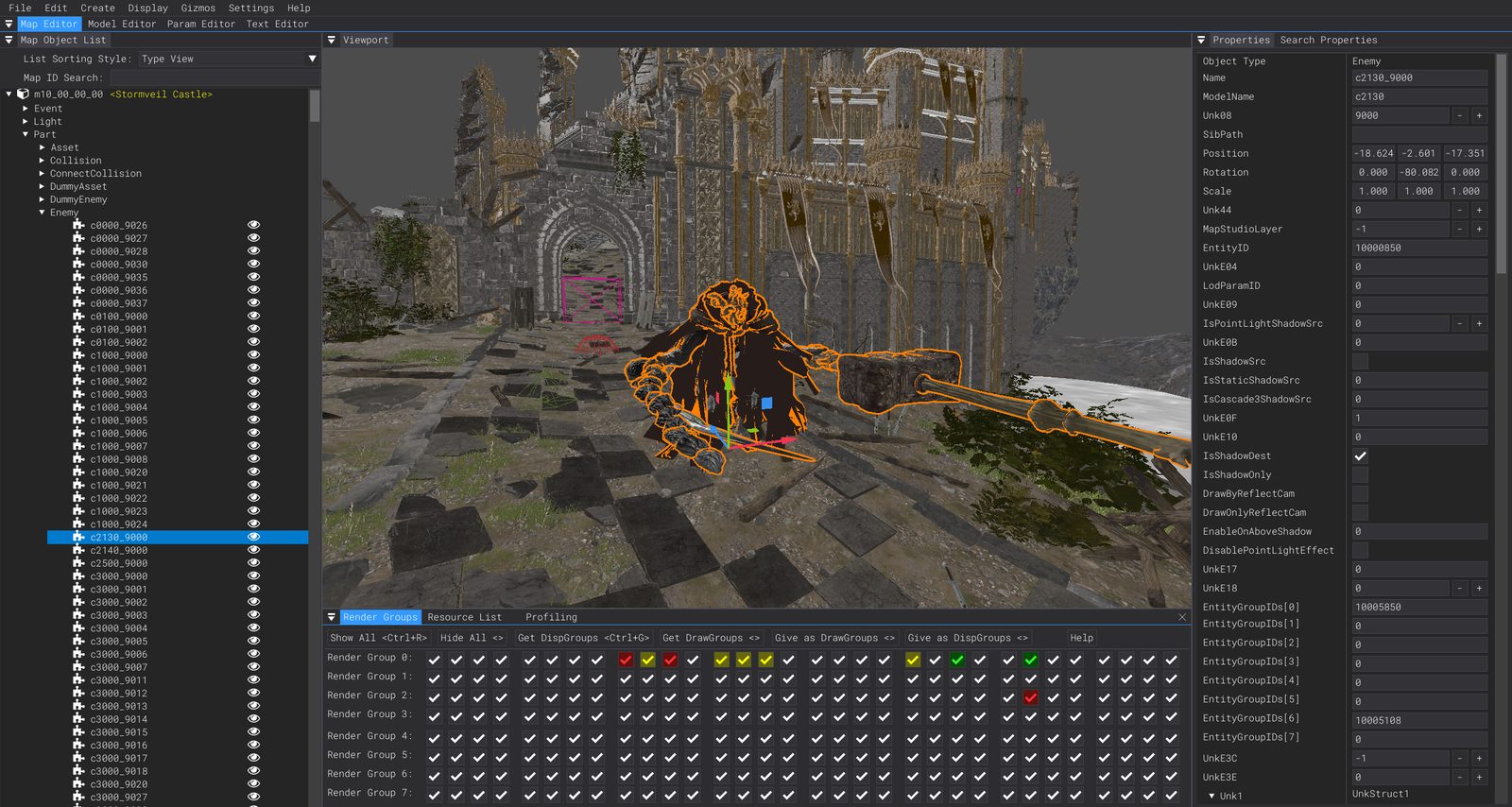
This 3D Map Editor viewport is the part that needs Vulkan. On Intel integrated graphics it stays black — run the Low Requirements build for params and text instead.
Confirm it's the GPU, not something else
Three signs together pin it on the GPU:
- The program opens and Param/Text editors work → not a runtime or wrong-download problem.
- Only the Map Editor fails — black viewport or a crash specifically on opening a map.
- Your display adapter is Intel integrated (HD/UHD/Iris/Iris Xe).
If it won't open at all (no window), that's runtimes — DSMapStudio won't open. No .exe to run? You got the source — no .exe found.
The fix — run the Low Requirements build
The release zip ships a second Low Requirements executable (added in v1.09, October 2023) that runs the Param and Text editors with no GPU at all, dropping only the 3D Map Editor — precisely the part Intel can't render.
- Extract
DSMapStudio.zipfrom the download page. - Run the Low Requirements executable instead of the standard
DSMapStudio.exe. - Create your project normally — param and text editing are byte-for-byte identical.
For param-based modding — balance, drops, shops, merging — this is a complete tool, not a downgrade.
What works on Intel vs what needs Vulkan
| Task | Intel integrated | Needs Vulkan GPU |
|---|---|---|
| Edit params (weapons, drops, shops, enemies) | ✓ | — |
Merge regulation.bin via CSV | ✓ | — |
| Edit in-game text | ✓ | — |
| Mass edit, CSV export/import | ✓ | — |
| 3D Map Editor viewport | ✗ | ✓ |
| Place/move enemies and objects | ✗ | ✓ |
| Edit map layout (MSB) visually | ✗ | ✓ |
If your mod never touches map layout or enemy placement, integrated Intel covers everything through the Param Editor.
Intel Arc ≠ Intel integrated graphics
The trap: Intel Arc (the A-series discrete cards and newer dedicated GPUs) is not the integrated graphics covered here. Arc is a discrete GPU with full Vulkan support, so the Map Editor generally runs on it — try the standard build. The unsupported hardware is specifically the built-in HD/UHD/Iris/Iris Xe that shares the CPU. Arc card → standard build; Iris Xe/UHD → Low Requirements build.
Check your GPU and Vulkan support before assuming
A lot of "Intel" laptops actually ship a discrete NVIDIA/AMD GPU that's sitting idle — switching to it is the cleanest fix of all.
- Identify the adapter: Task Manager → Performance, or run
dxdiagand read the Display tab(s). One Intel UHD/Iris entry and nothing else = integrated only. - Force the discrete GPU (if present): Windows Settings → System → Display → Graphics → add
DSMapStudio.exe→ Options → High performance, then launch the standard build. - Verify Vulkan version: GPU-Z shows whether the GPU reports Vulkan;
vulkaninfo(Vulkan SDK) prints the exact supported version. You want 1.3-capable hardware (NVIDIA 900 / AMD 400 series or newer).
If you genuinely need the Map Editor
- Do the map work on a machine with a discrete GPU (Maxwell/900 or Polaris/400 or newer) and keep params/text on the Intel one — projects are portable between machines.
- Check for a switchable discrete GPU in your laptop first (above).
- Switching to Smithbox won't help: the fork uses the same Vulkan-based Map Editor and carries the identical GPU requirement. See DSMapStudio vs Smithbox.
For everything that isn't 3D map editing you're not blocked: download, run the Low Requirements build, start at the Param Editor hub. If you do have a Vulkan GPU after all, the Map Editor guide covers the 3D workflow.