Editors · Param Editor
DSMapStudio Param Editor Guide
DSMapStudio Param Editor Guide
Almost everything that defines how a FromSoftware game plays — weapon damage, enemy HP, drop rates, shop stock, spell effects, starting classes — lives in params: spreadsheet-like tables packed inside regulation.bin. The Param Editor opens those tables and lets you change them, and it's the most-used editor in DSMapStudio by a wide margin. Rebalance a weapon, change a drop, merge two mods — it all happens here. This page assumes a project is open; if not, start at creating your first project.
What it edits
A param is a table. Each row is one game entity — a weapon, an enemy type, a shop entry — identified by a numeric row ID. Each column (a field) is one property: attack power, weight, scaling, drop chance. EquipParamWeapon row 1000000 is one weapon; its columns hold that weapon's physical damage, scaling letters, and stat requirements. All these tables sit together in regulation.bin (Elden Ring, DS3, Sekiro, AC6), the single packed file DSMapStudio reads through your project. Editing a param changes behavior without touching any model, animation, or map — which is why param editing is the foundation of most mods.
Opening params
With a project created against your unpacked game, click the Param Editor tab. DSMapStudio reads regulation.bin and lists every param table down the left — hundreds of them. Select one (start with EquipParamWeapon); its rows fill the middle, and clicking a row shows its fields on the right.
Empty list or garbage values? That's a project-setup problem — packed files or wrong Game Type — not a Param Editor one (first project setup). Won't load at all with "Unknown DCX format"? Your game patch is newer than your tool version (fix).
Navigating the table
Three things turn a wall of numbers into something readable:
- Row names from Paramdex. Raw rows have only IDs; DSMapStudio overlays human names from Paramdex (a community database), so
1000000shows as a named weapon. Missing names is a Paramdex issue, not a broken file — row names explained. - The search bar. Type part of a name or an ID to jump to a row; type a field query to narrow by value.
- The Modified filter. Type
modifiedin the search box and the table collapses to only the rows that differ from vanilla. This is the single most important tool here — it shows exactly what a mod (or you) changed, and it underpins exporting, merging, and conflict resolution. Learn it before anything else; every advanced workflow depends on it.
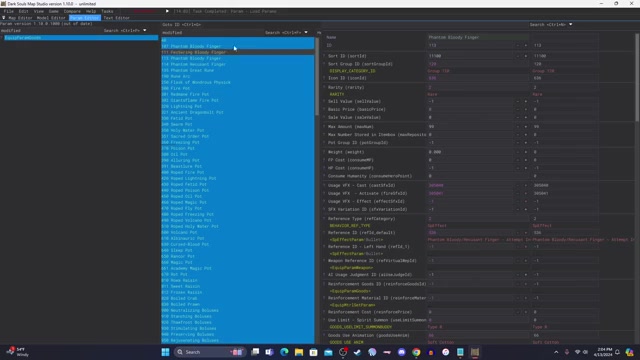
The Param Editor with the Modified filter active — the table collapsed to only the changed rows. Frame from EucliFox's merge tutorial.
Core operations
- CSV export and import — pull rows to a spreadsheet, edit in bulk, bring them back. Backbone of bulk edits and mod sharing.
- Mass edit — change many rows at once with a command (e.g. +10% to every weapon) without exporting.
- Update params after a patch — carry your edits onto a newer
regulation.bin. - Row names and Paramdex — how naming works and how to fix missing names.
Saving — and why edits don't show in-game yet
Edits aren't written until you save. Ctrl+S (or File → Save Params) writes a modified regulation.bin into your project's mod subfolder — never over your unpacked baseline, which stays clean. The project remembers its edits between sessions.
But saving in DSMapStudio does not put the mod in your game. The game loads regulation.bin through ModEngine2, so the last step of any param mod is pointing your ModEngine2 config at the project's mod folder. Until you do, the Modified filter shows your changes in the editor but you won't see them in-game — almost always ModEngine configuration, not a failed edit. Because edits live in the project and never touch the baseline, you can keep multiple projects against one unpacked game and switch freely.
Common params reference
The tables you'll open most, and what each controls (names are consistent across the Souls/Elden Ring titles; some are split or renamed per game):
| Param table | Controls | Typical edit |
|---|---|---|
EquipParamWeapon | Weapons — damage, scaling, requirements, weight | Rebalance a weapon |
EquipParamProtector | Armor — defenses, weight, resistances | Adjust armor |
EquipParamGoods | Consumables and key items | Change item behavior |
Magic | Sorceries and incantations | Edit spell cost/power |
SwordArtsParam | Ashes of War / weapon arts | Reassign or tweak a skill |
ItemLotParam (map/enemy) | Loot from enemies and chests | Change what drops |
ShopLineupParam | Merchant inventories | Add/remove shop items |
NpcParam | Enemy/NPC stats including HP | Make an enemy tougher |
SpEffectParam | Status effects, buffs, debuffs | Tune a build-up |
CharaInitParam | Starting classes and loadouts | Edit a starting class |
ReinforceParamWeapon | Per-upgrade-level weapon scaling | Adjust upgrade curves |
AtkParam_Pc / AtkParam_Npc | Individual attack data | Change an attack's damage |
Names differ slightly by game — Elden Ring splits ItemLotParam into map and enemy variants, some titles rename fields — but the structure is the same everywhere.
Next: the CSV export/import workflow for bulk edits, merging regulation.bin to combine mods, or installation and first project if you're not set up.
Watch it in action
Community video guides this article draws on — credit to their creators.