Troubleshooting · Download
Why You Can't Find DSMapStudio.exe (and How to Fix It)
Why You Can't Find DSMapStudio.exe (and How to Fix It)
You extracted the zip, opened the folder for DSMapStudio.exe, and it isn't there — just a src folder, a .sln file, and a pile of .cs files. Nothing went wrong with the extraction. You downloaded the source code instead of the release build: two different downloads GitHub places right next to each other, and the most common first-time DSMapStudio mistake there is. Two-minute fix.
The mistake: source code instead of the release
GitHub offers two downloads for every project and only one contains a runnable program:
- The big green Code button — and the auto-generated "Source code (zip)" link on each release — give you the C# source developers compile. There is no
DSMapStudio.exeinside because nothing has been built yet. This is what you grabbed. - The release asset, a file named
DSMapStudio.zipattached under a specific release, is the already-built program. This is what you want.
Clicked the green Code button, or "Source code (zip)" from the releases list? Wrong one. Delete it and get the asset.
Source zip vs release zip
| Source code zip (wrong) | Release DSMapStudio.zip (correct) | |
|---|---|---|
| Where it comes from | Green Code button / "Source code (zip)" | Release Assets dropdown |
| Filename | DSMapStudio-master.zip / ...-1.11.1.zip | DSMapStudio.zip |
| After extracting | src folder, .sln, .cs files | DSMapStudio.exe + .dll files + asset folders |
| Runnable? | No — uncompiled code | Yes — double-click DSMapStudio.exe |
| Size | Small (a few MB of text) | Larger (built app + libraries) |
If your folder matches the left column, that's the entire problem.
Where the correct download lives
- Open the DSMapStudio Releases page — Releases, not the main code page.
- Find the latest release (v1.11.1).
- Expand the Assets dropdown under it. The asset you want —
DSMapStudio.zip— sits above the two greyed-out "Source code (zip)" / "Source code (tar.gz)" links that GitHub always lists last. - Download
DSMapStudio.zip(it may carry the version number). Ignore the "Source code" links beneath it.
The site's download page links straight to the correct asset if you'd rather skip the dropdown.
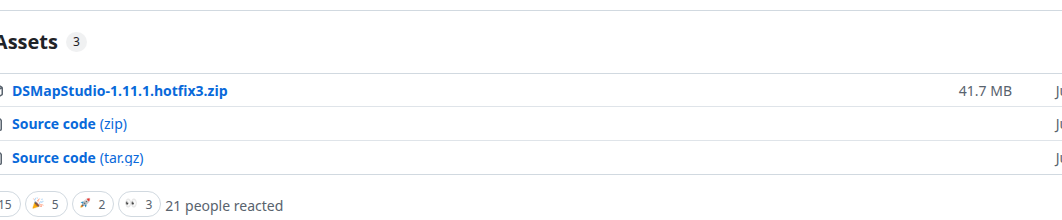
The release Assets list: download the DSMapStudio…zip asset (the program), not "Source code (zip)".
What the correct folder looks like
Extract DSMapStudio.zip somewhere writable — C:\Modding\DSMapStudio\ is fine; avoid Program Files. At the top level you should see DSMapStudio.exe, a second Low Requirements executable beside it (for machines without a Vulkan GPU), several .dll files, and supporting asset/data folders. Double-click DSMapStudio.exe to launch. If it's there but won't start, that's runtimes, not the download — see DSMapStudio won't open.
There's no installer — it's portable
The second half of this confusion: people get the right zip, then hunt for a setup.exe, assume the download is broken when there isn't one, and re-download — often landing on the source code the second time. DSMapStudio has no installer, no setup wizard, no Start Menu entry, no Program Files deployment. Extracting is the install. Once DSMapStudio.exe is in the folder, you have everything.
Still don't see the .exe after getting the release?
If you're sure you downloaded the asset and it's still missing:
- You're peeking inside the zip without extracting. Some file managers preview zip contents in place. Extract All to a real folder first, then look.
- Antivirus deleted it. Engines quarantine
DSMapStudio.exefor its file-injection libraries. Check quarantine, restore, and exclude the folder. - It nested a level deeper. Extraction sometimes produces
DSMapStudio\DSMapStudio\— open the inner folder.
With the real DSMapStudio.zip extracted you've got the program. Next: install the runtimes and create a project — installation guide, then your first project.